Local-first Windows desktop app

Capture bugs fast.
Report without breaking flow.

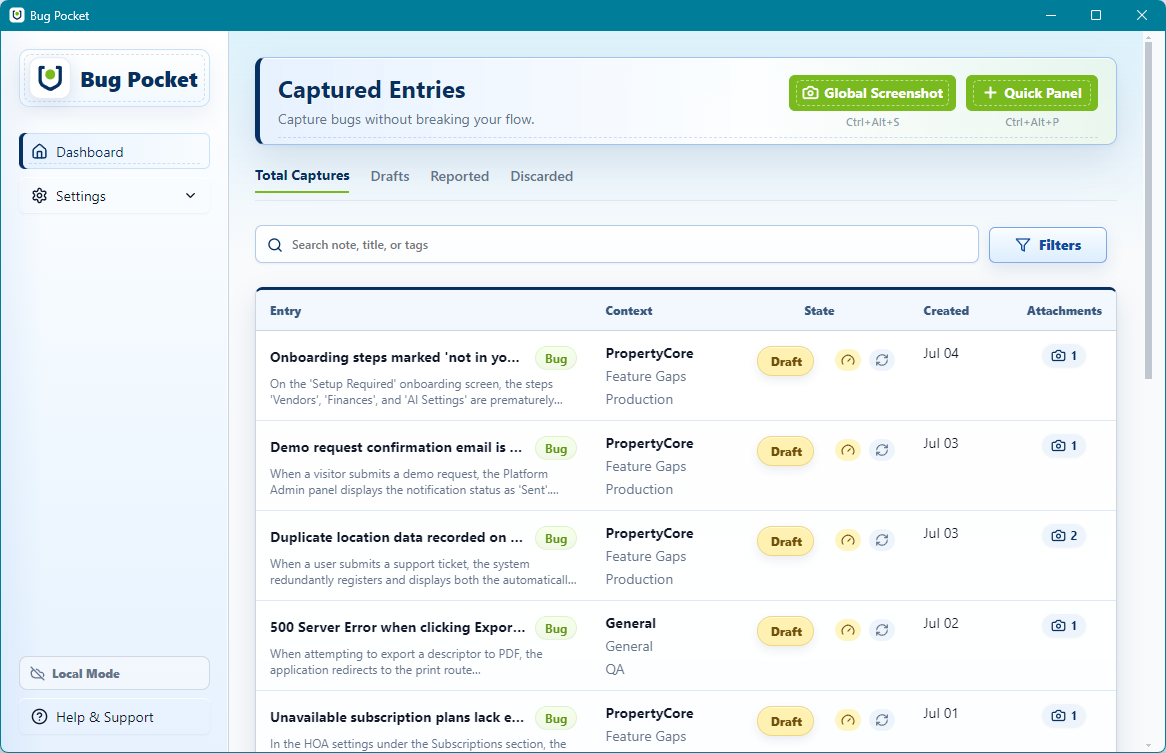
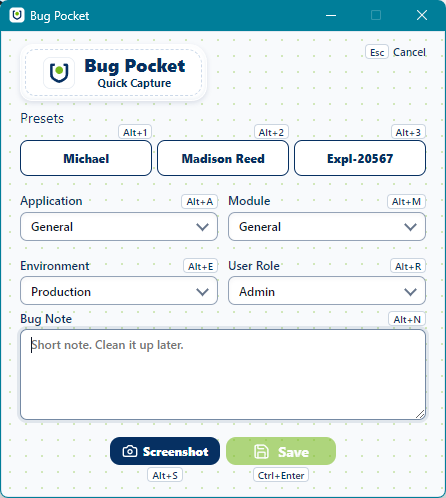
Bug Pocket keeps defect capture close to the work with a global shortcut, a quick note, an annotated screenshot, and a structured report ready for Linear and Jira. All local. No cloud required.

Download for Windows Local Only by default
Bug Pocket Dashboard Bug Pocket Quick Capture
🗄️
Storage SQLite (100% local)
Global Shortcut Ctrl+Alt+P to capture
🔗
Integrations Linear & Jira
🤖
AI Triage BYOK (your key, local)

The problem

Context-switching to log bugs kills your testing flow.

You spot a bug mid-session. Opening a browser, navigating to Jira, pasting screenshots, and re-typing environment details takes time; by the time you're done, you've lost the exact screen state that made the issue reproducible.

Before Bug Pocket

Context switching breaks your testing momentum.

Bug details, screenshots, module context, and tracker fields scatter across tabs, folders, and short-term memory.

  • Switch to browser, open tracker, find the right project
  • Re-type environment and module from memory
  • Hunt for the screenshot you already took
  • Lose your place in the test flow entirely
After Bug Pocket

Press a shortcut. Capture. Keep going.

Capture context instantly with a global shortcut, annotate the screenshot in-app, and return to testing in seconds. Clean up and dispatch to Linear or Jira when you're ready.

  • Global shortcut opens capture in under a second
  • Application, Module, and Environment pre-fill from presets
  • Annotated screenshot attaches automatically
  • Formatted report ready to push when the session ends
Step 01

Capture

Press Ctrl+Alt+P to open Quick Capture or Ctrl+Alt+S to snip directly. Fill a short note and attach a screenshot without leaving the app you're testing.

Step 02

Annotate

Draw arrows, add text, or mask sensitive data directly on your screenshot using the built-in canvas annotator. Annotations are non-destructive; originals stay intact.

Step 03

Report

Open the Dashboard, refine the fields, optionally run AI Triage to auto-populate Steps to Reproduce, then copy a formatted report or open a pre-filled Linear/Jira ticket.

Core Features

Everything you need. Nothing you don't.

A lightweight suite built for speed and reliability.

System-Wide Overlay

Trigger captures instantly from any screen or application without losing focus.

Local Storage

All data stays on your machine by default.

Frictionless Handoff

Push rich, formatted tickets directly to your issue tracker.

Built for real QA work

Test complex products without losing a single finding.

QA leads, testers, and developers moving through multi-module applications can capture bugs, scenarios, observations, and questions without losing the exact screen state, module, environment, and evidence that made the issue clear.

Bug Pocket captures all five entry types (Bug, Scenario, Question, Observation, and Improvement) so you never have to decide what something is while you're in the middle of testing.

Privacy and trust

Local Only is the default, not a premium feature.

Bug reports contain sensitive product details, unreleased UI states, and environment-specific data. Bug Pocket keeps everything on your machine unless you explicitly opt into Cloud Sync.

Private by default

Every capture starts as a local-only record stored in SQLite on your machine. Sensitive portal evidence never leaves your device unless you choose to sync.

Optional Cloud Sync

When your team needs shared visibility, an optional Cloud Sync tier pushes reports to a central workspace, without changing the fast, local-first capture experience.

Your AI key, your control

AI Triage uses your own API key, encrypted locally with Windows safeStorage. No shared cloud AI key is ever bundled into the app.

With content-addressed local storage, encrypted key handling, and no required cloud account, Bug Pocket is built on the principle that your test data belongs to you.

BugPocket

Ready when the next bug appears

Keep reporting velocity in your pocket.

Free Windows desktop app. No cloud account required. Your data stays yours.